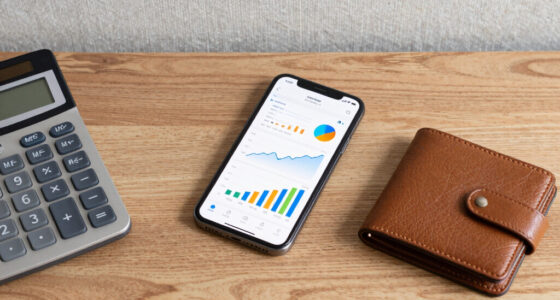
This checklist is for people who want to add practical layers of protection around their investment accounts and the devices and documents used to manage them. The picks cover account access, screen privacy, file storage, paper handling, and a webcam cover. Think of them as parts of a broader routine: each addresses a different kind of exposure. Account security works best when digital and physical habits support each other.

Get smart everyday buys delivered free with Prime
- Fast, free delivery on millions of items
- Prime Video, Amazon Music and more included
- Member-only deals all year
The sections are organized by the role each product can play, from helping protect sign-ins to managing sensitive files and paper. Product names alone do not establish every feature, dimension, or compatibility detail, so use the exact model information and your own setup to confirm a fit before buying. Check the details against your devices, storage needs, and workspace.
Use this checklist to identify your most immediate gap, then review the look-for points before choosing a product. Confirm that a key works with the services you use, that a filter matches your monitor, and that storage or office equipment suits your actual workload and space. Start with fit and the security task you need to address.
Hardware Security Key
A hardware security key can add a physical step to signing in, which makes it a useful item to consider for investment accounts and the email account that helps manage them. The listed pick is a FIDO2 key with a MIFARE DESFire NFC smart card, but the product name by itself does not confirm which services support it, how enrollment works, or whether the NFC function fits your devices. Service compatibility is the first check.
A common mistake is buying a key before checking account security settings or assuming every sign-in flow accepts the same key standard. Review the security options for each service you plan to protect, and verify supported protocols and connection methods. Consider where you will use the key: a computer port, a phone with NFC, or both. Check your devices and the product’s connector details before ordering.
Plan for access if the key is misplaced or unavailable. Check whether your services allow backup keys or another recovery method, and keep recovery information securely. If the key includes a card form factor, confirm what role that card plays and whether it is separately enrolled. Set up recovery before relying on a new sign-in method.
What to look for:
- Confirm the FIDO2 key is supported by each account or service you use.
- Check the connector type and compatibility with your computer and phone.
- Verify what the MIFARE DESFire NFC smart card does and how it is enrolled.
- Review whether the product supports a backup key or recovery plan for your services.
- Confirm setup instructions and required software, if any.
FIDO2 Security Key with MIFARE DESFire NFC Smart Card for 2FA MFA

This security key supports FIDO2 v2.1, U2F, and CTAP1 for secure two-factor authentication and passwordless sign-in. It features a MIFARE DESFire EV2 card for physical access control, with AES encryption and a tamper-resistant secure element.
Pros:
- Supports multiple authentication standards for versatile security
- Combines digital and physical access in one card
- Certified secure element with tamper resistance
- Swiss-engineered design with reliable warranty
Cons:
- Requires compatible services and physical access systems
- May be complex for users unfamiliar with smart cards
Best for: People checking whether their account services support a FIDO2 security key.
Not ideal for: Anyone who has not confirmed service and device compatibility.
Bottom line: Verify support and recovery options for your accounts before making this key part of your sign-in routine.
Privacy Screen Filter
A privacy screen filter is intended to help limit what people nearby can see on a display, making it relevant when reviewing account information in a shared office or public setting. The listed pick is a two-pack magnetic filter for 27-inch computer monitors, but monitor size alone does not establish a fit. Screen dimensions and the monitor’s frame shape both matter.
A frequent buying mistake is matching only the advertised diagonal measurement. Check the visible screen width and height, aspect ratio, bezel, and whether the magnetic attachment points align with your monitor. The product name ends with “16,” which may refer to a specification that needs clarification in the seller’s listing; do not assume its meaning. Verify the full listing before purchase.
Think about how you work with the display: whether the filter can be removed easily, whether it affects your view when seated directly in front, and whether it changes brightness or clarity. Confirm the pack contents and whether both filters suit your intended screens. Test the viewing angle in the positions you commonly use, especially if you share the monitor or move between desks.
What to look for:
- Measure the monitor’s visible width and height, not just its diagonal.
- Confirm the monitor’s aspect ratio and bezel or frame compatibility.
- Clarify the trailing “16” specification in the product listing.
- Check how the magnetic attachment works and whether the filter is removable.
- Review included contents and intended use for both filters.
2 Pack 27-Inch Magnetic Privacy Screen Filter for Computer Monitors 16:9

This set includes two magnetic privacy screens designed for 27-inch monitors with a 16:9 aspect ratio. The filters block side views to protect privacy, reduce blue light and UV rays, and feature a sleek matte finish with easy tool-free attachment.
Pros:
- Easy tool-free magnetic attachment and removal
- Effective privacy protection with micro-louver technology
- Reduces blue light and UV rays, easing eye strain
- Includes two screens suitable for dual monitors or sharing
Cons:
- Compatible only with frameless or ultra-narrow-bezel monitors
- Measurement tolerance may affect fit on some screens
- Limited to 27-inch monitors with specific dimensions
Best for: People with compatible 27-inch monitors used around others.
Not ideal for: Anyone whose monitor dimensions or frame do not match the listing.
Bottom line: Match the filter to the monitor’s actual dimensions and confirm the seller’s specifications before ordering.
Encrypted USB Flash Drive
An encrypted portable drive can be considered for storing sensitive files outside a computer, including documents related to account management. The listed pick is an Apricorn Aegis Padlock 2TB hardware-encrypted portable external drive. The name identifies capacity and a hardware-encryption feature, but it does not establish connection type, operating-system support, or how access is protected. Confirm the exact model and its requirements.
A common mistake is treating encryption as a complete backup plan. Consider what files you need to keep, how often they change, and where a separate backup will live. Check whether the drive’s capacity is appropriate for those files and whether the product’s access method fits your workflow. Plan storage and backup together rather than relying on a single copy.
Before purchase, review the drive’s interface, supported systems, power needs, and instructions for setting or recovering access credentials. Hardware-encrypted products may have specific procedures for unlocking and handling forgotten credentials; confirm those details in the documentation. Keep the drive somewhere secure when it is not in use, and make sure the intended computer can connect to it. Read the setup guidance before storing important records.
What to look for:
- Verify the exact Aegis Padlock model and its hardware-encryption details.
- Check the drive interface, power requirements, and supported operating systems.
- Decide whether 2TB fits your planned files and backup approach.
- Review credential setup, lockout, and recovery procedures in the documentation.
- Confirm how the drive connects to each computer you plan to use.
Apricorn Aegis Padlock 2TB Hardware-Encrypted Portable External Hard Drive

This portable 2TB drive uses 256-bit AES XTS hardware encryption and an integrated keypad for PIN-based access. It connects over USB 3.0, requires no software or administrator rights, and supports up to five user PINs plus an administrator PIN.
Pros:
- Hardware encryption with keypad-based PIN access
- Works without software installation or administrator rights
- Compatible with PC, Mac, and USB-enabled operating systems
- Rugged design with epoxy coating and brute-force self-destruct feature
Cons:
- Uses a rotating 5400 rpm hard drive
- Requires PIN entry through the integrated keypad
Best for: People who need portable storage and have verified device support.
Not ideal for: Anyone without a separate plan for backing up important files.
Bottom line: Confirm connection and recovery details, then pair the drive with a separate backup routine.
Locking File Cabinet
A locking file cabinet can help keep paper records in one designated place, which may be useful for investment statements, tax documents, or other financial paperwork you choose to retain. The listed pick is a FireKing Turtle vertical two-drawer, fire-rated cabinet in Arctic White. The product name does not confirm its exact dimensions, lock style, or the protection details that apply to its fire rating. Check the specifications for your records and room.
A common buying mistake is choosing by drawer count or appearance without checking what the cabinet can hold. Review interior dimensions, hanging-file compatibility, weight, and the types of folders you use. Measure the intended location, including doorways and the space needed to open drawers. Measure the route as well as the final spot, and confirm delivery details with the seller.
Consider how you will manage keys or other access controls, and who needs access to the records. Look for the manufacturer’s documentation on the lock and fire rating, including any limits or conditions attached to those claims. A cabinet’s rating does not replace careful file organization or digital copies where appropriate. Choose a records routine that makes important paperwork easy to locate and appropriately protected.
What to look for:
- Confirm exterior and interior dimensions and the cabinet’s weight.
- Check compatibility with your folders or hanging-file system.
- Review lock type, key management, and access needs.
- Read the manufacturer’s documentation for the fire rating and its conditions.
- Measure the placement area, doorway route, and drawer clearance.
FireKing Turtle Vertical 2 Drawer Fire Rated File Cabinet, Arctic White
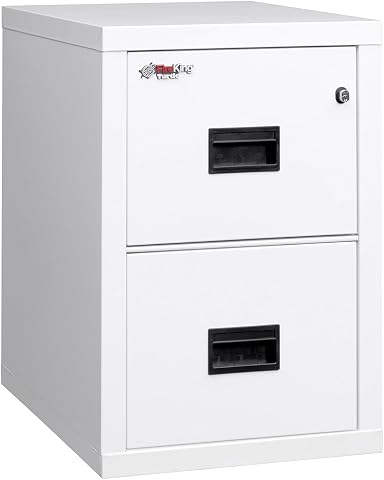
This fire-rated filing cabinet provides one-hour fire protection, keeping documents safe in extreme conditions. Made of high-quality steel, it features two easy-slide drawers for legal and letter-sized files, a secure lock system, and a sleek, scratch-resistant finish, ideal for small offices or home use.
Pros:
- Provides fire protection for up to 1 hour
- Secure lock system for anti-theft protection
- Sleek, scratch-resistant finish
Cons:
- Heavy to move (251 pounds)
- Limited to two drawers
- Made in the USA, which may affect availability
Best for: People organizing paper financial records in a fixed location.
Not ideal for: Anyone without enough room for the cabinet and open drawers.
Bottom line: Measure carefully and review the lock and fire-rating documentation before choosing a filing cabinet.
Document Shredder
A document shredder can support a routine for disposing of paper that contains personal or financial information. The listed pick is a 4005 cross-cut commercial office paper shredder with an automatic oiler. Its name suggests a cross-cut design and an oiling feature, but does not specify sheet capacity, accepted materials, bin size, or operating requirements. Match capacity to use before deciding.
A common mistake is buying a commercial office model without checking whether it fits the volume and space available. Review the manufacturer’s stated duty cycle, sheet capacity, bin capacity, and supported materials, along with the shredder’s footprint and power needs. Confirm what the automatic oiler does and whether maintenance supplies or steps are required. Check maintenance requirements as part of the purchase decision.
Consider where the shredder will sit and who will use it. Make sure its opening and controls suit the documents you intend to dispose of, and read the safety and jam-clearing instructions. Do not assume every paper or insert can be shredded; verify accepted materials in the product documentation. Follow the manual for safe operation and upkeep, and set a consistent process for papers that no longer need to be retained.
What to look for:
- Verify sheet capacity, duty cycle, and bin capacity in the manufacturer’s specifications.
- Confirm which materials the shredder accepts.
- Check footprint, power requirements, and placement needs.
- Review the automatic oiler’s operation and maintenance requirements.
- Read safety, jam-clearing, and upkeep instructions before use.
4005 Cross Cut Commercial Office Paper Shredder with Automatic Oiler, Continuous

This heavy-duty cross-cut shredder is designed for commercial use, handling 37-39 sheets at a time with a large 44-gallon bin. It features automatic oiling, jam prevention, and continuous operation, making it suitable for offices with 20-25 users.
Pros:
- High capacity shredder suitable for large office environments
- Automatic oiler and jam prevention features enhance usability
- Continuous operation allows for efficient shredding
Cons:
- Very heavy and bulky, may require sturdy setup space
- Requires 20AMP power outlet, limiting placement options
- No price information available
Best for: People handling recurring volumes of sensitive office paperwork.
Not ideal for: Anyone who has not checked capacity, space, or upkeep needs.
Bottom line: Compare the documented capacity and maintenance requirements with your actual paper-disposal routine.
Laptop Privacy Webcam Cover
A sliding webcam cover can provide a physical way to close a compatible camera when it is not in use. The listed pick is a slide-shutter cover for Logitech C920, C920x, C930e, and additional models indicated by the product name. A named camera match does not guarantee that the cover fits every version or mounting setup. Confirm the camera model and the seller’s compatibility list.
A common mistake is overlooking the space around the lens. Check the camera’s front shape, lens placement, and any surrounding indicator lights or microphone openings. Review the cover’s dimensions and attachment method, and make sure it will not interfere with the camera’s mount or the laptop’s use. Check clearance carefully before attaching anything.
Also confirm whether the cover is intended for a standalone webcam or a built-in laptop camera; this product name lists Logitech camera models, so do not assume it suits other devices. Review the instructions for installation and removal, especially if the camera is frequently repositioned. A physical shutter complements sensible app permissions and device settings. Use it as one layer alongside your usual camera controls.
What to look for:
- Match your exact Logitech webcam model to the seller’s compatibility list.
- Check cover dimensions and the camera’s lens and front-panel layout.
- Confirm the attachment method and whether it suits your camera’s surface.
- Make sure the shutter will not block indicators or interfere with the mount.
- Review installation guidance and whether the cover is removable.
Webcam Privacy Cover Slide Shutter for Logitech C920, C920x, C930e, and C922 Pro

A sliding privacy shutter that fits Logitech C920, C920x, C930e, and C922 Pro Stream webcams, as well as other popular models. The cover slides closed to block the camera lens and protect your privacy when not in use.
Pros:
- Compatible with a wide range of Logitech webcam models
- Simple sliding design for quick privacy control
- Cost-effective alternative to OEM covers
Cons:
- Third-party product not endorsed by Logitech
Best for: People with a compatible Logitech webcam who want a shutter.
Not ideal for: Anyone using a camera model or layout not listed by the seller.
Bottom line: Confirm the exact camera model and clearance around its lens before attaching a shutter.
If you are building this checklist in stages, start with the account-access gap that matters most, then address the devices and records you use regularly. Confirm compatibility before choosing the security key or screen filter, and check your storage and paperwork needs before selecting a drive, cabinet, or shredder. Prioritize the biggest gap and buy only what fits your routine.
Security habits work best when they are manageable: keep recovery options current, store records deliberately, and dispose of papers when they are no longer needed. Review each product’s exact specifications and instructions as you make a decision. Build your checklist gradually and keep it suited to the way you manage your accounts.
Fall Picks

Samsung Essential S3 27-Inch FHD Curved Monitor (S36GD)
As an affiliate, we earn on qualifying purchases.