
🔍 Read the full analysis: Which Of These 10 Best Graphics Cards For AI And Gaming Fits Your Needs? on ThorstenMeyerAI.com

Get smart everyday buys delivered free with Prime
- Fast, free delivery on millions of items
- Prime Video, Amazon Music and more included
- Member-only deals all year
TL;DR
A new buyer’s guide from ThorstenMeyerAI.com ranks ten graphics cards across gaming, upgrade, and display-support use cases. The GIGABYTE Radeon RX 9070 XT Gaming OC 16G leads the picks, with RTX 5080 models forming the premium tier and older GT 730, GT 740, and RX 580 cards serving narrower needs.
A newly published buyer’s guide from ThorstenMeyerAI.com ranks ten graphics cards for gaming and AI-oriented builds, naming the GIGABYTE Radeon RX 9070 XT Gaming OC 16G as the recommended starting point for most gaming PCs. The guide groups the cards into three tiers: current-generation gaming GPUs with 16GB of memory, a more restrained mid-range option in the ASUS Prime GeForce RTX 5070, and legacy cards such as the GT 730, GT 740, and RX 580 that address display and older-system needs rather than modern gaming.
The guide’s high-performance tier consists of the RX 9070 XT and three RTX 5080 variants, all of which carry 16GB of graphics memory. According to the author, the ASUS Prime RX 9070 XT and the GIGABYTE Gaming OC RX 9070 XT share the same GPU class, so differences in cooler design, card dimensions, and system fit matter more than the brand name. The three RTX 5080 options are described as premium variants of the same GPU, distinguished mainly by cooling hardware and physical fit, with the ROG Astral White emphasizing a distinctive build appearance.
The RTX 5070 is positioned as a step down in memory capacity and market positioning, described as a more measured current-generation route for buyers who do not need the top tier. At the lower end, the guide treats the GT 730 and GT 740 as display and compact-PC solutions — their multiple outputs or low-profile format do not make them current gaming alternatives — while the RX 580 with 8GB of memory sits between the legacy display cards and the newer gaming GPUs, potentially suiting an older budget system.
The selection method, according to the guide, ranked cards by how well each suits the likely job implied by the purchase: current gaming, upgrading an older PC, or adding display support. Gaming picks were weighted by GPU generation, memory capacity, and placement within the product family, with cooler and form-factor cues also considered since a powerful card is a poor fit if the case or system cannot support it.
The 10 picks
- 1
 ASUS ROG Astral GeForce RTX 5080 16GB GDDR7 White OC Edition Graphics CardView on Amazon →
 - 2
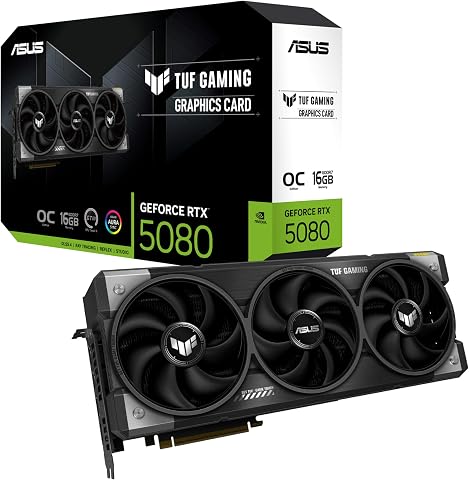 ASUS TUF Gaming GeForce RTX 5080 16GB GDDR7 OC Edition Graphics CardView on Amazon →
 - 3
 GIGABYTE GeForce RTX 5080 Gaming OC 16G Graphics CardView on Amazon →
 - 4
 ASUS Prime NVIDIA GeForce RTX 5070 OC Edition Graphics CardView on Amazon →
 - 5
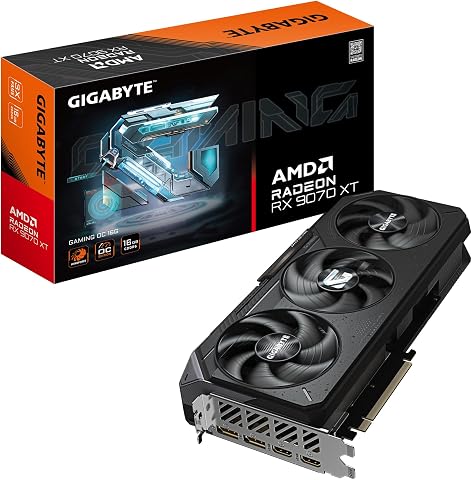 GIGABYTE Radeon RX 9070 XT Gaming OC 16G Graphics CardView on Amazon →
 - 6
 ASUS Prime Radeon RX 9070 XT 16GB GDDR6 OC Edition Gaming Graphics CardView on Amazon →
 - 7
 ASRock Radeon RX 9070 Challenger 16GB OC Graphics Card, RDNA 4, 2520MHz Boost…View on Amazon →
 - 8
 Kelinx AISURIX RX 580 8GB GDDR5 Graphics Card with Dual HDMI and DisplayPortView on Amazon →
 - 9
 GT 730 Graphics Card 4GB DDR3 64-bit with HDMI, DisplayPort, VGAView on Amazon →
 - 10
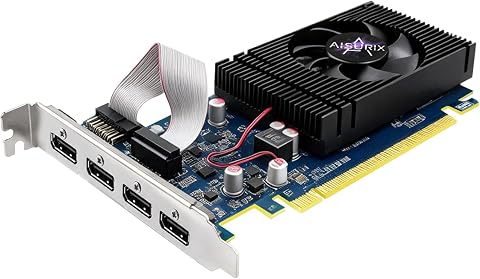 AISURIX GT 740 4GB GDDR5 Low-Profile Graphics Card with 4 HDMI PortsView on Amazon →
Why GPU Matching Matters This Generation
The guide’s central argument is that graphics-card purchases fail most often on fit rather than performance. Cards vary in length, thickness, and slot coverage even when they use the same GPU, and a mismatch in case clearance or power supply capacity can stall a build entirely. The author warns that powerful RTX 5080 and RX 9070 XT cards deserve particular attention on power, since an otherwise compatible PC may still need a power supply upgrade, and advises against improvised adapters without checking manufacturer guidance.
The piece also cautions against comparing model names without checking performance tests at the reader’s specific games and resolution, and against selecting a card by memory figure alone — more memory does not make an older GPU fast. For readers weighing AI workloads alongside gaming, the guide points to checking software-specific hardware guidance rather than relying on capacity numbers, since workload size determines whether 8GB or 16GB is adequate.
How the Ten Cards Stack Up
The roundup spans a wide range of hardware: from 4GB legacy display cards to modern 16GB models. The RTX 5080 family and the two RX 9070 XT boards form the capable-gaming group; the RTX 5070 offers a restrained current-generation option; the RX 580 provides 8GB for older budget platforms; and the GT 730 and GT 740 serve compact and multi-monitor configurations where a full-size gaming card is unnecessary or will not fit.
According to the guide, the older GT 730, GT 740, and RX 580 cards are not direct substitutes for the newer GPUs. They rank lower in the selection precisely because they address older or narrower needs, despite features such as extra display connections or a low-profile design.
“For most gaming PCs, I’d start with the GIGABYTE Radeon RX 9070 XT Gaming OC 16G, which pairs a current-generation GPU with 16GB of memory.”
— ThorstenMeyerAI.com buyer’s guide
What the Guide Leaves Open
The source material does not include specific benchmark figures, pricing, or power-consumption numbers for the ten cards, so readers cannot verify performance claims from the guide alone. The recommendations reflect the author’s stated ranking method rather than independent testing results. Availability of individual models — particularly premium RTX 5080 variants such as the ROG Astral White — can vary by region and retailer, and the guide’s AI-workload advice stops short of naming specific applications or minimum requirements. Readers should confirm current street prices and stock before acting on any pick.
Before You Buy Any Pick
Buyers following the guide’s advice should measure case clearance from the rear expansion slots to nearby obstructions, verify the manufacturer’s recommended power supply and available connectors, and check independent performance tests at their target resolution and games. Those considering a future display upgrade should confirm the rest of the system can keep up with a faster card. For AI workloads, the next step is consulting the specific software’s hardware guidance and typical project requirements before committing to an 8GB or 16GB model.
Key Questions
Which graphics card does the guide recommend for most gaming PCs?
The GIGABYTE Radeon RX 9070 XT Gaming OC 16G, which combines a current-generation GPU with 16GB of memory, according to the guide’s author.
Are the GT 730 and GT 740 suitable for modern gaming?
No. According to the guide, these cards serve display and compact-PC needs; their multiple outputs or low-profile format do not make them current gaming alternatives.
What is the difference between the ASUS Prime and GIGABYTE RX 9070 XT cards?
They share the same GPU class. The guide says differences in cooler design, card dimensions, and system fit matter more than the brand name, so buyers should compare them as separate board designs.
How much memory do I need for gaming or AI work?
The guide advises choosing memory for the workload, not the largest number: capacity matters more as resolution, texture detail, and workload size rise, but more memory alone does not make an older GPU fast. For AI applications, check the software’s own hardware guidance.
Why does the guide emphasize checking case fit and power supply?
Cards vary in length, thickness, and slot coverage even with the same GPU, and powerful models may require a stronger power supply than the card they replace. Planning the full system cost before choosing a card can prevent a stalled or unstable build.
Source: ThorstenMeyerAI.com
Fall Picks
fall essentials
As an affiliate, we earn on qualifying purchases.